 TecnoOrange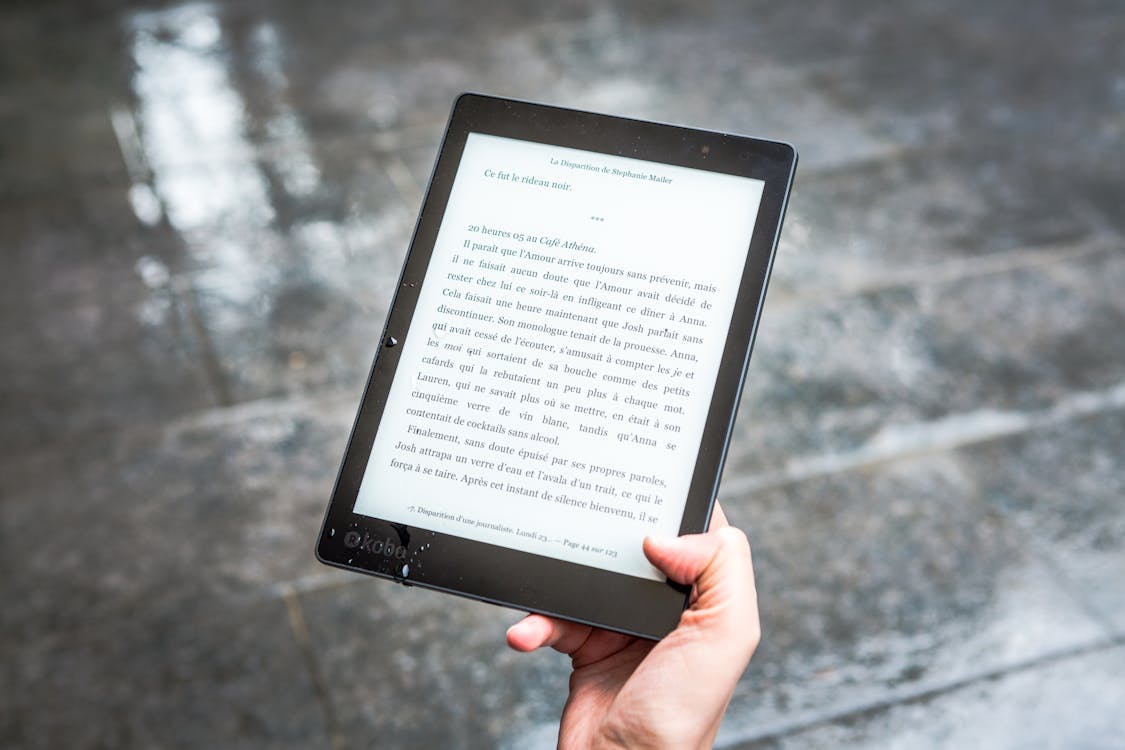
If you’ve ever seen a Kindle or e-reader tablet and noticed how different the screen looks, you’ve encountered an E-Ink display. This technology is fascinating because it works in a completely different way from the LCD or OLED screens we use daily. Here’s exactly what it is, how it works, and why I’m seeing it in more and more devices.
Table of contents
Table of contents
What is E-Ink screen technology and how does it work
E-Ink (electronic ink) is a display technology that mimics the appearance of printed paper. Unlike traditional screens that emit light, E-Ink displays reflect ambient light, just like a book or newspaper does.
The operation is ingenious. Inside the display are millions of microcapsules the size of a grain of sand. Each microcapsule contains positively charged white particles and negatively charged black particles, suspended in a clear fluid.
When an electric field is applied:
- White particles rise to the surface → the pixel appears white
- Black particles rise to the surface → the pixel appears black
- Grays are achieved by mixing both particle types
The most interesting part is that once the image is formed, the display doesn’t need power to maintain it. The image stays there until you change the page or content. It only consumes energy when updating, which explains why a Kindle can last weeks on a single charge.
I’ve been using E-Ink readers since 2015, and the technology has improved enormously. Early models were slow to update and only showed black and white. Current models like the Kindle Scribe or reMarkable 2 show grays, update quickly, and some even have color.
Pro-tip: If you’ve never used an E-Ink screen, the first time will feel strange because it doesn’t have the backlit glow of a phone. Give it a couple of days to adjust. Most people who try it don’t want to go back to reading on LCD.
Evolution of E-Ink technology
| Generation | Year | Features | Examples |
|---|---|---|---|
| E Ink Vizplex | 2007 | Black and white, slow | Kindle 1 |
| E Ink Pearl | 2010 | Better contrast, faster | Kindle 4 |
| E Ink Carta | 2013 | Higher resolution, better quality | Kindle Paperwhite |
| E Ink Carta 1200 | 2021 | 20% more contrast, faster | Kindle Paperwhite 5 |
| E Ink Gallery 3 | 2023 | Color, 50,000 colors | Boox Tab Ultra C |
| E Ink Carta 1300 | 2025 | Better refresh, less ghosting | Kindle Scribe 2 |
Advantages of E-Ink displays
After years using E-Ink devices for reading, work, and note-taking, here are the advantages I value most:
Eye protection. This is the main reason I use E-Ink for reading. Since it doesn’t emit blue light or flicker like LCD screens, eye fatigue is practically zero. I can read for hours without my eyes hurting, which I can’t do with a regular tablet.
Incredible battery life. My Kindle lasts 4-6 weeks on a charge. My reMarkable 2 lasts about 10 days with daily use. Compared to the 8-12 hours of a tablet, the difference is staggering. I don’t need to bring a charger when traveling.
Readability in sunlight. While LCD screens look terrible in direct sunlight, E-Ink displays look better the more light there is. It’s like reading a paper book: the more light, the clearer it reads. Perfect for reading at the beach or in the garden.
No distractions. E-Ink readers are single-purpose devices: reading or note-taking. No Instagram notifications, no temptation to open YouTube. For people who get easily distracted (like me), this is pure gold.
Natural writing feel. Models with stylus support like the reMarkable 2 or Kindle Scribe offer a writing experience that mimics paper. The friction of the pen on the surface and the lack of latency make writing feel almost like doing it in a notebook.
Pro-tip: If you’re worried about insufficient ambient light for nighttime reading, modern E-Ink readers have adjustable front light that illuminates the screen evenly without shining toward your eyes. It’s very different from a tablet’s backlight.
Disadvantages and limitations of E-Ink
Not everything is perfect with E-Ink. There are important limitations you should know before buying a device with this technology:
Slow refresh rate. This is the most obvious limitation. Updating an E-Ink screen takes between 100ms and 1 second, depending on the model and update type. For reading it’s not a problem, but for watching videos or browsing the web it’s unbearable. There are fast refresh modes that improve this, but they sacrifice image quality.
No self-backlight (on basic models). While modern models include front light, it’s not the same as an LCD’s backlight. You need some ambient light to read comfortably, just like with a paper book.
Limited color. Color E-Ink displays exist but can’t compete with OLED or LCD in color richness. Colors look washed out and color resolution is lower than black and white. For reading books or documents it works fine, but for photos or videos it’s not suitable.
Ghosting. Some E-Ink displays leave residual shadows of the previous image when updating. Modern models have improved this a lot by doing periodic full refreshes, but it’s still visible in some situations.
Price. Good E-Ink readers cost between $100-$400, and E-Ink tablets like the reMarkable 2 or Boox Tab Ultra can cost $500 or more. It’s a considerable investment if you only want to read books.
Pro-tip: If ghosting bothers you, most E-Ink readers have an option to do a full page refresh every X pages. Enable it in settings. It eliminates ghosting at the cost of a brief flicker every so often.
Popular E-Ink devices and real-world uses
E-Ink is no longer just for e-readers. The technology is expanding to other devices and uses worth knowing about:
E-book readers. Amazon’s Kindle is still the king. The Kindle Paperwhite ($150) is the best value for reading. If you want a bigger screen and writing, the Kindle Scribe ($350) is the premium option.
Digital note tablets. The reMarkable 2 ($350) is my favorite device for taking notes. Writing on it feels like paper, it has no distractions, and the battery lasts weeks. Ideal for students and professionals who take lots of notes.
E-Ink monitors. Boox and Dasung sell E-Ink monitors you can connect to your computer. They’re ideal for programming, writing, or extended reading without eye strain. They’re not cheap ($500-1000) but for people who spend 8 hours in front of a screen, they’re life-changing.
Electronic labels. Price tags in supermarkets use E-Ink because they consume almost nothing and update remotely. They’re also used in warehouses, hospitals, and offices to display information that changes infrequently.
Smartwatches. Some smartwatches use E-Ink screens to last weeks between charges. They’re not as pretty as an Apple Watch, but the battery life is incomparable.
Pro-tip: If you’re interested in trying E-Ink without spending much, the basic Kindle ($100) is the best entry point. If you like it, you can later upgrade to a more advanced device. Don’t buy a $400 E-Ink tablet without first trying whether the format works for you.
E-Ink device comparison
| Device | Price | Screen | Main Use | Battery |
|---|---|---|---|---|
| Kindle Paperwhite | $150 | 6.8” Carta 1200 | Reading | 6-10 weeks |
| Kindle Scribe | $350 | 10.2” Carta 1200 | Reading + notes | 3-4 weeks |
| reMarkable 2 | $350 | 10.3” Carta | Digital notes | 2 weeks |
| Boox Tab Ultra C | $500 | 10.3” Gallery 3 Color | Everything (Android) | 5-7 days |
| Kobo Libra 2 | $190 | 7” Carta 1200 | Reading | 4-6 weeks |
FAQ: Frequently Asked Questions
Is E-Ink better than a tablet for reading?
For book reading, yes. E-Ink causes less eye strain, looks better in sunlight, and the battery lasts weeks. For comics, magazines, or multimedia content, a tablet is better for color and refresh speed.
Can you use an E-Ink screen to browse the internet?
Technically yes, but it’s not a good experience. The slow refresh rate makes scrolling through web pages frustrating. Android E-Ink readers like Boox allow installing browsers, but the experience doesn’t compare to a regular tablet.
How long do E-Ink screens last?
E-Ink screens are very durable. The technology doesn’t suffer burn-in like OLED and components don’t degrade significantly with use. A Kindle can last 5-8 years of daily use without screen issues. The battery is what degrades first.
Are E-Ink screens good for your eyes?
Yes, they’re the most eye-friendly displays available. They don’t emit blue light, don’t flicker, and reflect ambient light like paper. Eye doctors recommend them for extended reading, especially for people with light sensitivity or digital eye strain.
Conclusion
E-Ink screen technology is one of the most underrated innovations in the tech world. It’s not for everyone or every use case, but for reading and note-taking, it offers an experience that no backlit screen can match.
My recommendation: if you read more than 30 minutes a day and the eye fatigue from traditional screens bothers you, an E-Ink reader is worth every penny. Starting with a basic Kindle is the cheapest way to find out if this format works for you. Do you have an E-Ink device? What do you think of the technology?